Magic Tattoo: A Dingbats Font for Web Designers
When you are building a digital experience, the small details often leave the biggest impression. A landing page header, a call-to-action border, or a decorative icon set can define whether a user stays or bounces. That is where Magic Tattoo steps in. This dingbats font brings a fun, hand-drawn tattoo aesthetic directly into your layout, giving you a collection of symbols, emblems, and ornamental marks that feel personal, bold, and anything but generic. As a web designer or digital product creator, you know that a unique visual language sets a brand apart. Magic Tattoo offers exactly that: a ready-made set of expressive glyphs that can become the signature accent in your next project.
What Makes Magic Tattoo Different for Digital Design
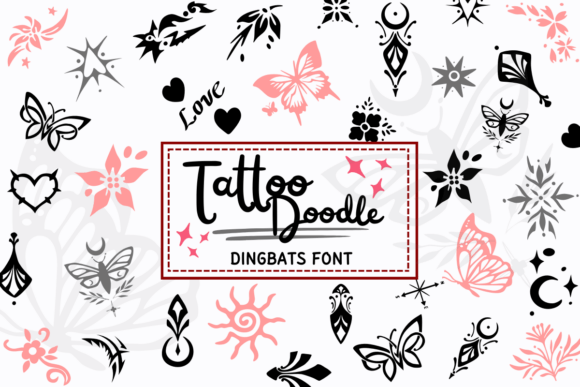
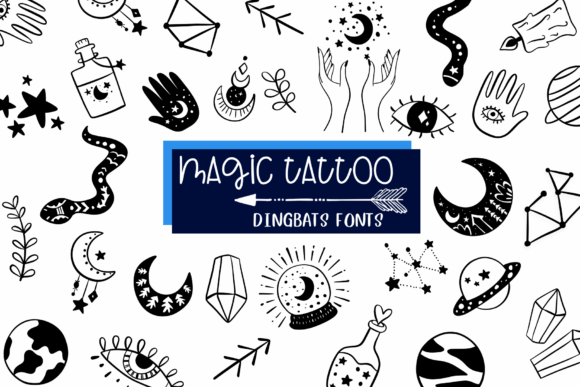
Magic Tattoo is not your typical set of vector icons. It is a dingbats font, meaning every character in the typeface maps to a distinct symbol rather than a letter. The style evokes classic flash tattoos – think intricate lines, vintage motifs, hearts, daggers, flowers, and mythical creatures – all rendered with a clean, modern edge. This personality lends itself perfectly to web design because it delivers an immediate emotional cue. A tattoo-inspired element says creativity, individuality, and craftsmanship. Unlike stock clip art, using a dingbats font keeps your design cohesive because all symbols share the same stroke weight, contrast, and overall aesthetic. That consistency is crucial for maintaining a professional brand identity across pages.
Visual Characteristics That Matter on Screen
The glyphs in Magic Tattoo are designed with clear outlines and strong silhouettes, which means they hold up well even at smaller sizes. On a high-resolution retina display, the finer details remain crisp. On a standard monitor, the shapes stay legible. This is a practical advantage for web use: you can scale the font up for a hero background element or down for a tiny accent without losing shape integrity. The font’s personality leans toward the bold and expressive, making it an excellent choice for hero sections where you want to establish a distinct mood quickly. Think of a landing page for a creative agency, a tattoo artist’s portfolio, or a boutique streetwear brand – the tattoo motif reinforces the message before a single word is read.
Strategic Placement for Visual Hierarchy and Conversion
In conversion-focused layouts, every element competes for attention. A dingbats font like Magic Tattoo can become a powerful tool for establishing visual hierarchy when used selectively. The best place to start is in your headers and hero titles. Replacing a standard bullet or decorative line with a Magic Tattoo symbol adds a handmade, curated feel. For example, a hero section for a handcrafted product line could include a floral tattoo glyph framing the headline. This draws the eye and sets a thematic context. However, because the symbols are detailed, avoid using them as body text or long paragraphs – they work best as standalone accents, icon replacements, or short phrase embellishments.
Call-to-action buttons are another smart application. A small tattoo-style arrow or star beside your “Get Started” text can increase click-through rates by adding a subtle visual nudge. The key is restraint. Using Magic Tattoo sparingly in buttons, section dividers, and corner ornaments helps users scan the page naturally. The brain registers the unique icon as a landmark, making navigation intuitive. For online store banners, a tattoo label can highlight a sale badge or product category in a way that feels authentic to the brand, not promotional.
Practical Examples for Real Web Projects
- Creative Portfolio Site: Use Magic Tattoo symbols as bullet icons in your service list or as decorative corners around project mockups. The font’s hand-drawn quality complements photography and illustration work.
- Boutique Online Store: Replace standard cart icons and favorite buttons with matching tattoo glyphs. It creates a cohesive shopping experience that feels intentional. Especially effective for stores selling apparel, accessories, or home decor with a vintage or artisan vibe.
- Coaching Website: A mindset or leadership coach targeting a creative audience might use a flame or compass icon from the set to represent growth or direction. Use it sparingly in section headers to reinforce the brand story.
- Product Landing Page: For a limited-edition launch, tattoo-style ornaments around the product image act as a framing device that suggests exclusivity and craft. Pair with a simple sans serif for body copy to keep the page readable.
- Course Sales Page: Add a small dagger or rose on the enrollment CTA to give it a distinct personality. A subtle touch that makes the button memorable.
- Blog Header: Use a large tattoo glyph as a background watermark or as a badge next to the blog title. It makes the header instantly recognizable in a feed.
- Digital Brand Kit: If you build brand templates for clients, include Magic Tattoo in the icon library. Its thematic unity makes creating social media graphics, email headers, and slide decks consistent.
Readability and Responsive Considerations
When designing for the web, you must consider how a font behaves across devices. Magic Tattoo’s glyphs are generally simple enough to remain legible on mobile screens if used at a minimum size of around 16–20 pixels. Because they are monochrome line art, they work beautifully on light backgrounds with a dark color, and on dark backgrounds they pop when set in white or a bright accent color. Over images, add a subtle shadow or overlay to keep the icon distinct. For small buttons or navigation icons, avoid scaling the glyph below 14 pixels – at that size, details like fine lines may blur, and the shape might become muddy. If you need tiny icons, consider using the font for larger accents and relying on solid geometric shapes for micro-interactions.
Responsive layout testing is straightforward: because Magic Tattoo is a font, you can control its size, color, and spacing with standard CSS. Use relative units like em or rem to ensure the symbols scale with the rest of your typography. Unlike image-based icons, font icons remain sharp on any screen resolution and can be animated or hover-styled without additional assets. That makes them ideal for interactive elements like hover reveals on portfolio thumbnails.
Font Pairing for a Polished Digital Identity
To make Magic Tattoo work effectively, pair it with a complementary body typeface. Because the font is decorative and highly expressive, keep your supporting typography simple. A neutral sans serif font like Open Sans, Lato, or Inter provides a clean contrast that lets the tattoo symbols shine without visual clutter. For a more editorial or sophisticated pairing, try a serif font such as Playfair Display or Lora – this combination works well for lifestyle brands, fashion, or design publications. If you want a handcrafted feel, a script font or handwritten font could match the organic line quality, but use extreme caution to avoid overwhelming the layout. The rule is: one decorative element per screen. Let Magic Tattoo be the star, and keep everything else neutral and highly readable.
For web designers building branded experiences, this pairing philosophy extends to your entire design system. Use Magic Tattoo for accent icons, section dividers, and hero embellishments. Then use a sans serif for headings and body copy. This creates a clear visual hierarchy: the tattoo elements draw attention, while the sans serif delivers the content. The brand tone becomes playful yet professional, artistic yet trustworthy.
File Formats, Styles, and Licensing
When you purchase a commercial font like Magic Tattoo, you typically receive the font in OTF (OpenType) and TTF (TrueType) formats. These work on both Mac and Windows. For web use, you should convert the font to WOFF and WOFF2 formats to ensure fast loading and broad browser compatibility. Many designers use a font delivery service or self-host the files with @font-face. Magic Tattoo includes a single style – the dingbats set – which means there are no weight variations (like bold or light) unless the product specifically includes multiple weights. Check the product description for alternates or ligatures; some dingbats fonts include stylistic alternates that give you different versions of the same symbol, adding variety without needing extra files.
Multilingual support is typically not applicable for dingbats fonts because they contain symbols rather than letters. If your project requires extensive language coverage, you will need a separate text font for that. The practical takeaway: Magic Tattoo is a display font meant for short decorative uses, not for body copy. That limitation is actually its strength – it forces you to be intentional and reduces the risk of overuse.
Commercial Licensing for Websites and Client Work
Whenever you use a font in a commercial project – whether it is a live website, an online store, a landing page you build for a client, or a digital template you sell – you must verify the licensing terms. Magic Tattoo, like most premium fonts, is sold under a standard desktop license for personal and commercial use. However, web use often requires a separate web font license or a license that covers embedding the font in CSS for a specific number of pageviews or domains. If you are designing for a client’s website, include the font license cost in your project budget. For your own online store or digital brand kit, purchase the appropriate license that covers your expected traffic and usage. Many font foundries offer tiered licensing, so check the product page or contact the seller. A legitimate license protects you and your client from legal issues and supports the type designer who created Magic Tattoo.
As a best practice, keep a record of the licenses for every font you use in a project. If you offer design assets like templates or brand kits for sale, ensure the license allows redistribution in that format. Some licenses prohibit bundling fonts with templates, so you may need to direct users to purchase their own copy. Always read the fine print – it is part of professional web design.
Bringing Magic Tattoo into Your Workflow
Integrating Magic Tattoo into your digital projects is straightforward. Download the font, install it locally for mockups, and upload the webfont files to your server or use a @import via a link if available. Use CSS to target specific elements where you want icons. For example, you can use the ::before pseudo-element to insert a glyph as a list item marker or as a decorative accent beside a heading. This keeps your HTML semantic and your design lightweight. Because it is a font, you can apply transitions, transforms, and shadows with ease. A hover effect that slightly scales or changes the color of a Magic Tattoo symbol adds an interactive polish that feels dynamic without heavy scripting.
If you are designing a brand identity for a tattoo studio, a music festival, a craft brewery, or any brand that values authenticity, this font can become a core element. Use it in social media graphics to maintain the same visual language across platforms. The symbols translate well to favicons, app icons, and email newsletter headers. The key is consistency – once you establish a look with Magic Tattoo, apply it through all brand touchpoints. That builds recognition and trust.
Ultimately, Magic Tattoo gives you a creative font that is both a design asset and a strategic tool. Its dingbats style is not a trend; it is a way to infuse personality into digital spaces that often feel too clean or corporate. Use it where you want a reaction – in a hero section that demands a second glance, on a button that begs a click, or as a signature mark that tells visitors this brand has character. With careful placement and thoughtful pairing, Magic Tattoo can elevate your web projects from standard to unmistakable.